

Annnnnnnnnnd, there’s this too.
Russia’s Interfax news agency said on Monday that Bastion missile-launchers had been sent to Kaliningrad.
Source: Kaliningrad: New Russian missile deployment angers Nato – BBC News
Annnnnnnnnnd, there’s this too.
Russia’s Interfax news agency said on Monday that Bastion missile-launchers had been sent to Kaliningrad.
Source: Kaliningrad: New Russian missile deployment angers Nato – BBC News

Whoa, boy.
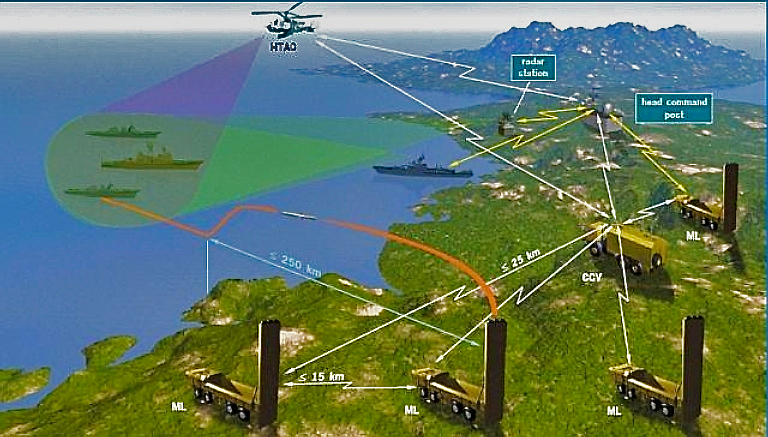
That’s pretty aggressive.
The Russian Navy’s Pacific Fleet has deployed state-of-the-art anti-ship missile systems on two of the islands off Hokkaido claimed by Japan, the fleet’s newspaper reported recently.
Source: Russia deploys anti-ship missiles on disputed isles off Hokkaido | The Japan Times

Weather Map for Venice, CA — via Weather Underground (http://bit.ly/WUmshare).
View on the web: http://www.wunderground.com/cgi-bin/findweather/getForecast?query=33.992838,-118.469407
At roughly $1,165 a square foot, the transaction is one of the priciest ever per square foot for a large office complex in Los Angeles.
http://www.labusinessjournal.com/news/2016/nov/18/oracle-buys-santa-monica-offices-368-million/

So, the Backbone scene isn’t what it used to be. But, I recently implemented a Backbone solution with RequireJS. I really like having the ability to “lazy load” resources on demand.
Anyone who has worked with Backbone’s router knows that your code can get quite lengthy when the number of routes starts to grow. The example below shows a simple router with three routes. But what if you have ten? What then?
// Backbone's sample router
var Workspace = Backbone.Router.extend({

  routes: {
    "help":                 "help",    // #help
    "search/:query":        "search",  // #search/kiwis
    "search/:query/p:page": "search"   // #search/kiwis/p7
  },

  help: function() {
    ...
  },

  search: function(query, page) {
    ...
  }

});
I started out by placing the actual routes in a separate file that I could read in to my router.js file. I created a new file for the routes and moved them in there. I added the JSON and Text plugins for RequireJS so I could load the data from the routes.json file.
I used the routes to create a new instance of a Backbone Router.
var AppRouter = Backbone.Router.extend({ routes: routes });
Since I already had the routes as a JavaScript object, I used them to create a single-dimension array.
var appRouter = new AppRouter();
var views = Object.keys(appRouter.routes).map(function (c) {
 return c;
});
I also made sure that each route had the same name as its respective view-controller. So, the route to help should load a file named help.js.
Then, I simply needed to iterate over the array of routes, defining routing event handlers for each one. I embed a require function call that loads the respective view-controller, passing it in to the callback function.
Once inside the function, I instantiate the Backbone View class and call its render function.
views.forEach(function(view) {
    appRouter.on('route:' + view, function() {
        require(['views/' + view], function (ViewClass) {
            var viewInstance = new ViewClass();
            viewInstance.render();
        });
    });
});
Et voila!
One caveat: loading Backbone views asynchronously can cause events to re-bind when the view is loaded again. This can lead to weird UI side-effects, like “ghost” or “zombie view” problems. Derick Bailey discusses how to resolve such issue in his Los Techies article.
Have a WordPress.com account? Log in now.

