

Why jQuery Rocks – Reason #41
I’ve spent much of my afternoon looking at implementing an elegant solution to enable a degree of keyboard navigation for what is effectively an HTML slideshow.
I’d wired up a keypress event handler, but the tricky part actually turned out to be how to hide the current element and display the next (or preceding) one. Getting it to work on two slides was easy because you have an either/or situation; but once the model grows beyond that, it becomes necessary to keep a stateful record of the current position so it doesn’t get lost.
Now, jQuery has a ton of built in tools that will allow you to navigate DOM elements to your hearts content. But after banging on a bunch of these solutions for a couple hours, I realized that jQuery has all the functionality I needed built-in to its API.
One of the niftiest aspects of the query selector syntax is the pseudo-selector. Just like CSS implements a:hover and a:visited, jQuery implements mySelector:visible. That’s is! It’s so easy.
$(document).keypress(function(e) {
	// Left-arrow key event handler
	if (e.keyCode == 37) {
		$(".bio-panel:visible")
			.hide()
			.prev()
			.show();
		return false;
	}
	// Right-arrow key event handler
	if (e.keyCode == 39) {
		$(".bio-panel:visible")
			.hide()
			.next()
			.show();
		return false;
	}
});
Pre-Computer Internet
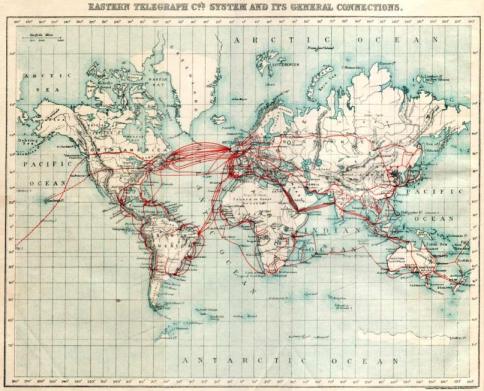
Early 1980s intercontinental internet traffic followed (geographically) the same basic infrastructure that had existed for much of the previous century. The image above illustrates early submarine telecommunications lines.
Firefox 3.5 on 3.5 inch Floppies

This poster set is about our old friends, 3.5 inch floppy disks. Higher density drives are built to read, write and even format lower density media without problems, provided the correct media are used for the density selected. This Posters shows, how many floppies are enough for current softwares.
Result (Approximate)
46 disk for iTunes 8.02
358 disk for Adobe Photoshop CS4
1760 disk for the Sims 3


